エクスプローラで Git 操作ができるクライアントソフト TortoiseGit を用いて、追加したサブモジュールの中にあるネスト(入れ子)したサブモジュールを再帰的に初期化する手順を紹介します。
追加したサブモジュールをフォルダごと削除した後に、もう一度同じサブモジュールを追加しようとした際に発生したエラーと対処例も紹介します。

※ TortoiseGit-2.17.0.2-64bit を使用します。
サブモジュールの追加
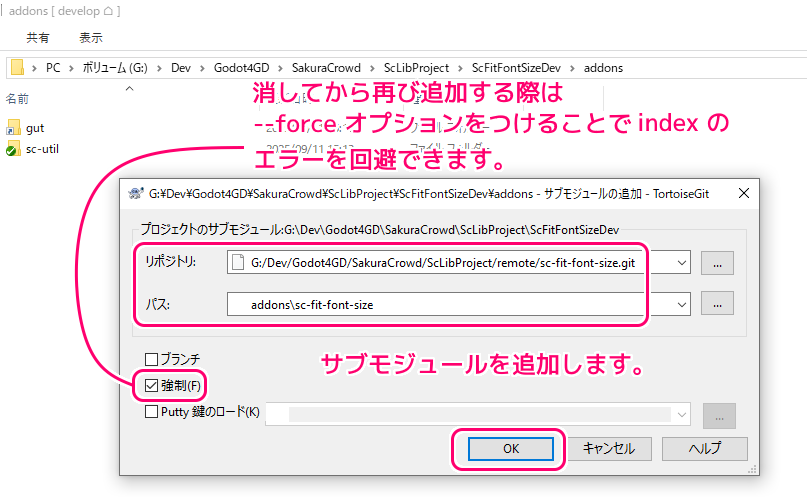
サブモジュールを追加するローカルリポジトリの作業ディレクトリをエクスプローラで開いて、右クリックで表示されるメニュー「TortoiseGit」→「サブモジュールの追加」を選択します。
「サブモジュールの追加」ダイアログで
- 「リポジトリ」項目に、サブモジュールとして追加するリモートリポジトリの URL
※例では PC 内のリモートリポジトリをフォルダパスで指定しています。区切り文字は \ ではなく / です。 - 「パス」項目に、サブモジュールの追加先のフォルダパス
を入力して OK ボタンを押します。
フォルダを削除したサブモジュールを再び追加したい場合は「強制」にチェックをつけます。
サブモジュール(例では sc-fit-font-size)が追加されました。
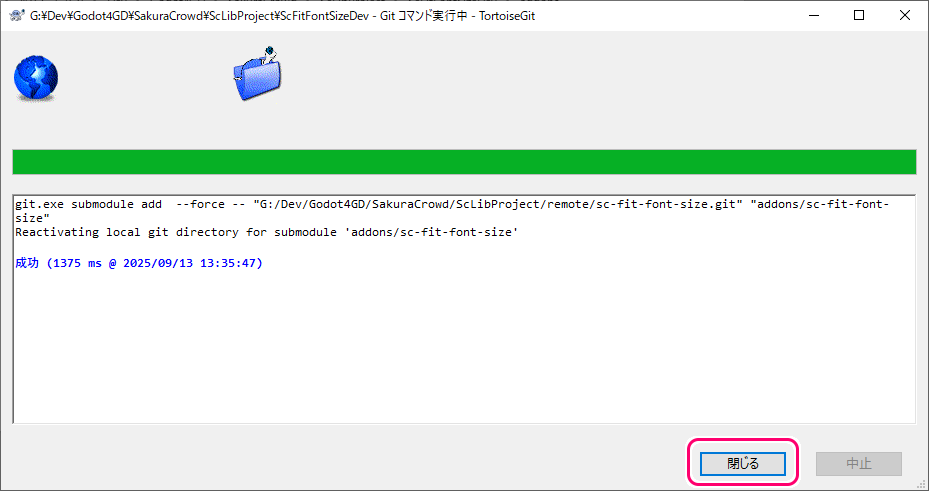
git.exe submodule add  --force -- "G:/Dev/Godot4GD/SakuraCrowd/ScLibProject/remote/sc-fit-font-size.git" "addons/sc-fit-font-size"
Reactivating local git directory for submodule 'addons/sc-fit-font-size'

成功 (1375 ms @ 2025/09/13 13:35:47)
削除したサブモジュールを追加する際は –force オプションを指定
前の章の「サブモジュールの追加」ダイアログの「強制」チェックボックスは、 git submodule add コマンドの –force オプションに対応します。
This option is only valid for add, deinit and update commands. When running add, allow adding an otherwise ignored submodule path. This option is also used to bypass a check that the submodule’s name is not already in use. By default, git submodule add will fail if the proposed name (which is derived from the path) is already registered for another submodule in the repository. Using –force allows the command to proceed by automatically generating a unique name by appending a number to the conflicting name (e.g., if a submodule named child exists, it will try child1, and so on). When running deinit the submodule working trees will be removed even if they contain local changes. When running update (only effective with the checkout procedure), throw away local changes in submodules when switching to a different commit; and always run a checkout operation in the submodule, even if the commit listed in the index of the containing repository matches the commit checked out in the submodule.
このオプションは、add、deinit、および update コマンドに対してのみ有効です。 add の実行時に、無視されるサブモジュール パスの追加を許可します。このオプションは、サブモジュールの名前がまだ使用されていないことのチェックをバイパスするためにも使用されます。デフォルトでは、提案された名前 (パスから派生した) がリポジトリ内の別のサブモジュールにすでに登録されている場合、git submodule add は失敗します。 –force を使用すると、競合する名前に数字を追加して一意の名前を自動的に生成してコマンドを続行できます (たとえば、child という名前のサブモジュールが存在する場合、child1 が試行されます)。 deinit を実行すると、サブモジュールの作業ツリーは、ローカルな変更が含まれている場合でも削除されます。更新を実行するとき (チェックアウト手順でのみ有効)、別のコミットに切り替えるときにサブモジュール内のローカルの変更を破棄します。また、含まれるリポジトリのインデックスにリストされているコミットがサブモジュールでチェックアウトされたコミットと一致する場合でも、常にサブモジュールでチェックアウト操作を実行します。
Git – git-submodule Documentation と Google 翻訳
例えば、一度追加したサブモジュールのフォルダを削除した後に、再び同じサブモジュールを追加しようとしたとします。

このとき「強制」チェックボックス(–force オプション)にチェックを入れないと、以下のように index にすでに存在するためにサブモジュールを追加できません。
#おそらく、index はコミットする前のステージングエリアを指していると思います。
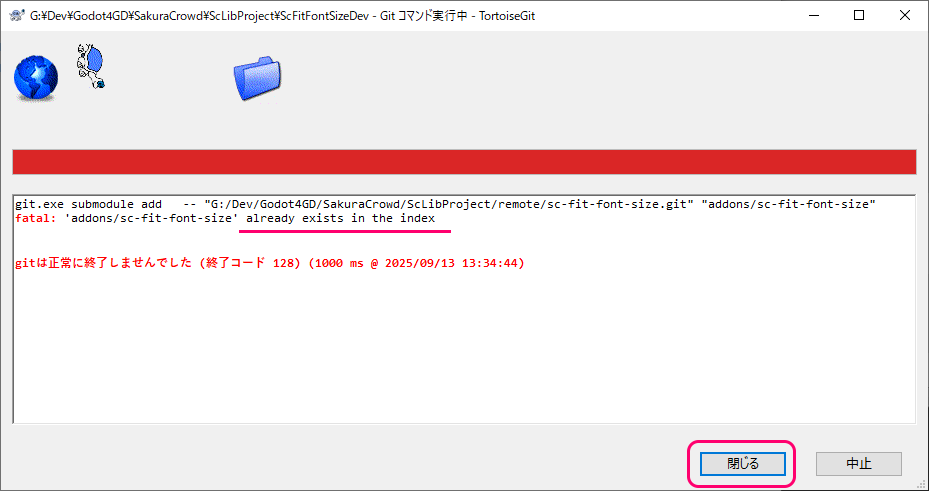
git.exe submodule add   -- "G:/Dev/Godot4GD/SakuraCrowd/ScLibProject/remote/sc-fit-font-size.git" "addons/sc-fit-font-size"
fatal: 'addons/sc-fit-font-size' already exists in the index


gitは正常に終了しませんでした (終了コード 128) (1000 ms @ 2025/09/13 13:34:44)
サブモジュールの中のサブモジュールを再帰的に初期化
サブモジュールを追加した後に、そのサブモジュール内のサブモジュール(例では sc-fit-font-size サブモジュールの中の sc-util サブモジュール)のフォルダは空です。
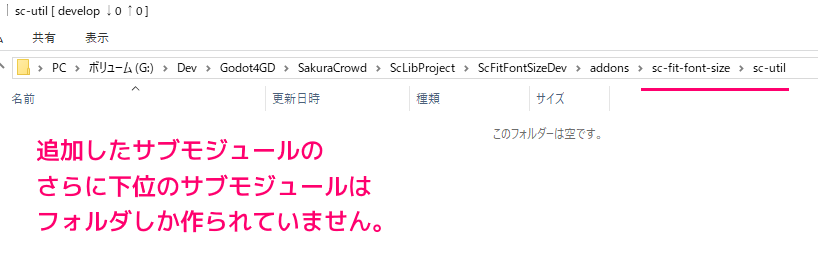
サブモジュール内のサブモジュールを初期化するため、サブモジュールの更新を行います。
Update the registered submodules to match what the superproject expects by cloning missing submodules, fetching missing commits in submodules and updating the working tree of the submodules.
欠落しているサブモジュールのクローンを作成し、サブモジュール内の欠落しているコミットをフェッチし、サブモジュールの作業ツリーを更新することにより、スーパープロジェクトが期待するものと一致するように登録されたサブモジュールを更新します。
If –recursive is specified, this command will recurse into the registered submodules, and update any nested submodules within.
–recursive が指定されている場合、このコマンドは登録されたサブモジュールを再帰的に実行し、その中にネストされたサブモジュールを更新します。
–init
This option is only valid for the update command. Initialize all submodules for which “git submodule init” has not been called so far before updating.このオプションは更新コマンドに対してのみ有効です。更新する前に、これまで「git submodule init」が呼び出されていないすべてのサブモジュールを初期化します。
Git – git-submodule Documentation と Google 翻訳
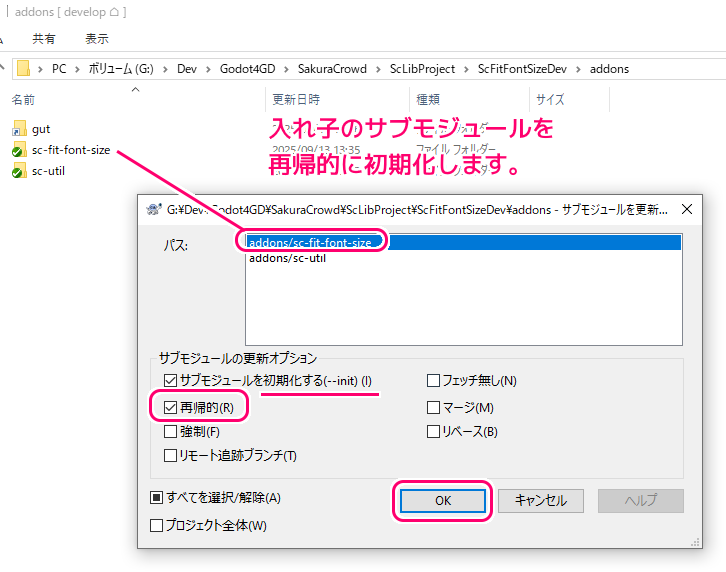
エクスプローラで、サブモジュールを持つスーパープロジェクト(サブモジュールの上位のフォルダ)を開いて、右クリックで表示されるメニュー「TortoiseGit」→「サブモジュールのアップデート」を選択します。
「サブモジュールを更新」ダイアログで、
「パス」のリストで、再帰的に初期化したいサブモジュールを選択
「サブモジュールの更新」オプションで、「サブモジュールを初期化する」と「再帰的」にチェック
して、 OK ボタンを押します。
サブモジュールの再帰的な初期化が成功しました。
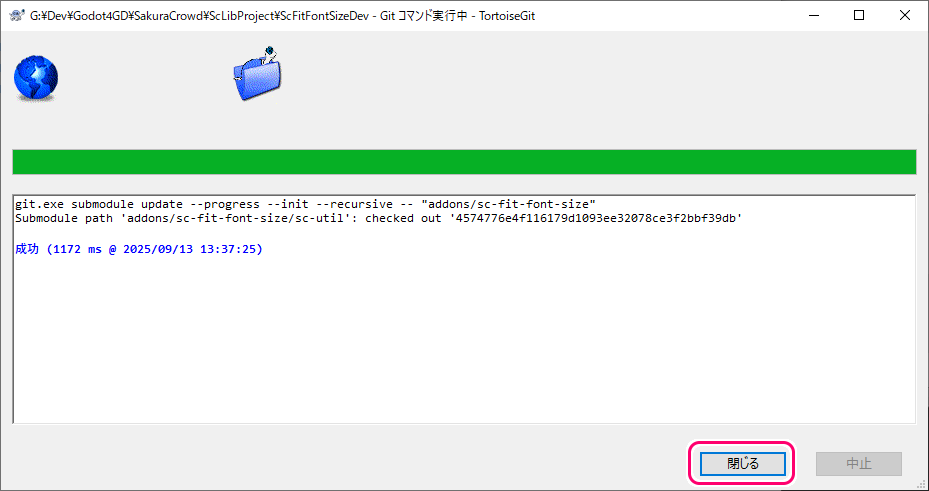
git.exe submodule update --progress --init --recursive -- "addons/sc-fit-font-size"
Submodule path 'addons/sc-fit-font-size/sc-util': checked out '4574776e4f116179d1093ee32078ce3f2bbf39db'

成功 (1172 ms @ 2025/09/13 13:37:25)
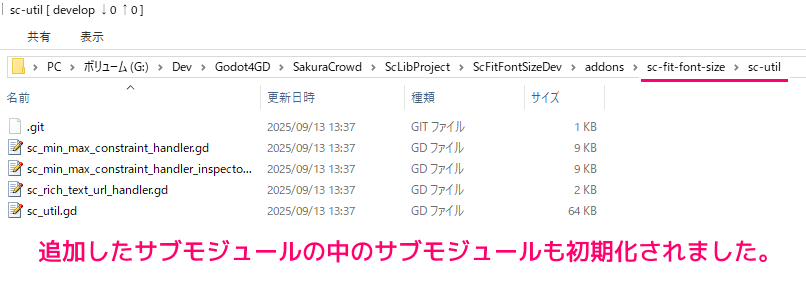
git submodule update –init –recursive を実行する前は空だった、サブモジュール内のサブモジュールが初期化されました。
まとめ
- TortoiseGit を用いてサブモジュールを追加しても、サブモジュール内のサブモジュールのフォルダは空でした。
- サブモジュール内のサブモジュールを初期化するために「サブモジュールの更新」ダイアログを実行しました。
- 「サブモジュールの更新」ダイアログでは、「サブモジュールを初期化する」と「再帰的」にチェックしました。
- フォルダを削除したサブモジュールを、再度追加する際は「強制」にチェックしました。
参照サイト Thank You!
記事一覧 → Compota-Soft-Press



コメント