リポジトリ内に配置した Git のサブモジュールを登録解除・削除する手順を紹介します。
残されているサブモジュール用のリポジトリの場所についても紹介します。
※Git-2.49.0 (64 bit) を使用します。
例として削除するサブモジュールについて
配置したサブモジュールを Git 管理を含めて削除します。
例として、 third_party/Gut に配置したサブモジュール(.gitmodules の2番目の項目)を削除します。
[submodule "addons/sc-util"]
	path = addons/sc-util
	url = G:/Dev/Godot4GD/SakuraCrowd/ScLibProject/remote/sc-util.git
[submodule "third_party/Gut"]
	path = third_party/Gut
	url = https://github.com/sakura-crowd/Gut.git
サブモジュールの登録解除
git submodule deinit コマンドを使用して、削除するサブモジュールの登録を解除します。
deinit [-f|–force] (–all|[–] <path>…)
Unregister the given submodules, i.e. remove the whole
submodule.$namesection from .git/config together with their work tree. Further calls togitsubmoduleupdate,gitsubmoduleforeachandgitsubmodulesyncwill skip any unregistered submodules until they are initialized again, so use this command if you don’t want to have a local checkout of the submodule in your working tree anymore.When the command is run without pathspec, it errors out, instead of deinit-ing everything, to prevent mistakes.
If
--forceis specified, the submodule’s working tree will be removed even if it contains local modifications.If you really want to remove a submodule from the repository and commit that use git-rm[1] instead. See gitsubmodules[7] for removal options.
deinit [-f|–force] (–all|[–] <パス>… )
指定されたサブモジュールの登録を解除します。つまり、 submodule.$name セクション全体をワーク ツリーとともに .git/config から削除します。さらに git submodule update、git submodule foreach、git submodule sync を呼び出すと、未登録のサブモジュールは再度初期化されるまでスキップされるため、作業ツリー内のサブモジュールのローカル チェックアウトを行わない場合は、このコマンドを使用します。pathspec を指定せずにコマンドを実行すると、間違いを防ぐために、すべてを初期化するのではなく、エラーが発生します。
–force が指定されている場合、サブモジュールの作業ツリーは、ローカルな変更が含まれている場合でも削除されます。
本当にリポジトリからサブモジュールを削除してコミットしたい場合は、代わりに git-rm[1] を使用します。削除オプションについては、gitsubmodules[7] を参照してください。
Git – git-submodule Documentation と Google 翻訳
削除したいサブモジュールを持つ上位のリポジトリのフォルダをカレントディレクトリにしたコマンドプロンプトで以下のようにコマンドを実行します。
例では third_party/Gut に配置したサブモジュールを削除します。
git submodule deinit -f 削除するサブモジュール名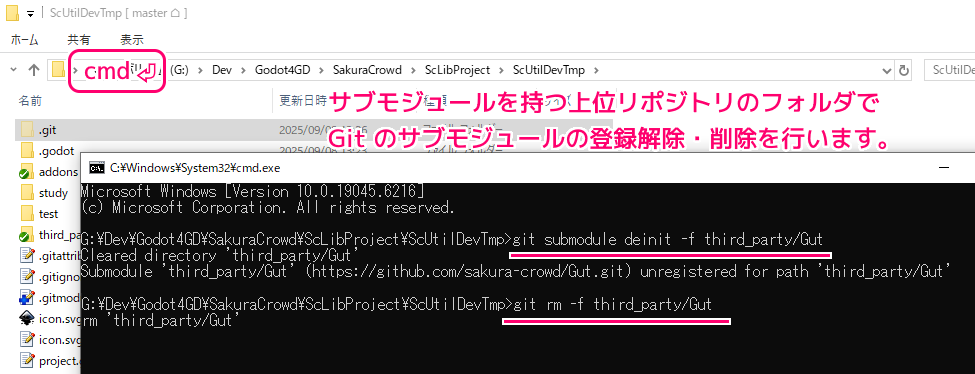
G:\Dev\Godot4GD\SakuraCrowd\ScLibProject\ScUtilDevTmp>git submodule deinit -f third_party/Gut
Cleared directory 'third_party/Gut'
Submodule 'third_party/Gut' (https://github.com/sakura-crowd/Gut.git) unregistered for path 'third_party/Gut'

G:\Dev\Godot4GD\SakuraCrowd\ScLibProject\ScUtilDevTmp>
実行後のメッセージから登録の解除が成功しました。
しかし、.gitmodules には、まだ third_party/Gut が残っています
[submodule "addons/sc-util"]
	path = addons/sc-util
	url = G:/Dev/Godot4GD/SakuraCrowd/ScLibProject/remote/sc-util.git
[submodule "third_party/Gut"]
	path = third_party/Gut
	url = https://github.com/sakura-crowd/Gut.git
サブモジュールの項目の削除
次に git rm コマンドでサブモジュールの項目を削除します。
git-rm – Remove files from the working tree and from the index
作業ツリーとインデックスからファイルを削除する
Only submodules using a gitfile (which means they were cloned with a Git version 1.7.8 or newer) will be removed from the work tree, as their repository lives inside the
.gitdirectory of the superproject. If a submodule (or one of those nested inside it) still uses a.gitdirectory,gitrmmoves the submodules git directory into the superprojects git directory to protect the submodule’s history. If it exists thesubmodule.<name> section in the gitmodules[5] file will also be removed and that file will be staged (unless--cachedor-nare used).gitfile を使用するサブモジュール (Git バージョン 1.7.8 以降でクローンされたことを意味します) のみがワークツリーから削除されます。これは、サブモジュールのリポジトリがスーパープロジェクトの .git ディレクトリ内に存在するためです。サブモジュール(またはサブモジュール内にネストされているものの 1 つ)がまだ .git ディレクトリを使用している場合、git rm はサブモジュールの履歴を保護するために、サブモジュールの git ディレクトリをスーパープロジェクトの git ディレクトリに移動します。存在する場合、gitmodules[5] ファイル内の submodule. セクションも削除され、そのファイルはステージングされます (–cached または -n が使用されている場合を除く)。
Git – git-rm Documentation と Google 翻訳
先ほどのコマンドプロンプトで以下のようにコマンドを実行します。
git rm -f 削除するサブモジュール名G:\Dev\Godot4GD\SakuraCrowd\ScLibProject\ScUtilDevTmp>git rm -f third_party/Gut
rm 'third_party/Gut'このあと .gitmodules を確認すると、指定したサブモジュール(例では third_party/Gut)のセクションが削除されました。
[submodule "addons/sc-util"]
	path = addons/sc-util
	url = G:/Dev/Godot4GD/SakuraCrowd/ScLibProject/remote/sc-util.git
サブモジュール用のリポジトリの削除
最後に、サブモジュール用のリポジトリが .git/modules/ 内にあるので、それを削除します。
エクスプローラで削除しても問題ありません。
※例では .git/modules/third_party/Gut がサブモジュール用のリポジトリのフォルダです。
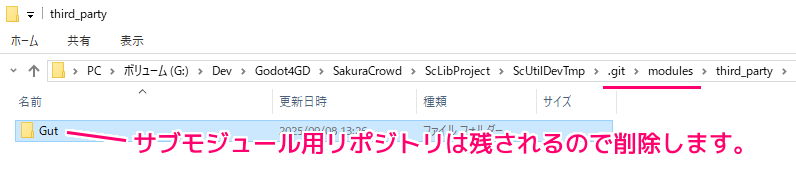
コマンドプロンプトで行う際は、 rmdir /s コマンドで、そのリポジトリのフォルダを削除します。
G:\Dev\Godot4GD\SakuraCrowd\ScLibProject\ScUtilDevTmp>rmdir /s .git\modules\third_party\Gut
.git\modules\third_party\Gut、よろしいですか (Y/N)? y
ディレクトリを削除します。
/s ディレクトリ ツリー (指定したディレクトリとそのすべてのサブディレクトリ (すべてのファイルを含む) を削除します。
rmdir | Microsoft Learn
まとめ
- サブモジュールを削除する際は、サブモジュールを持つ上位のリポジトリを操作します。
- git submodule deinit コマンドを使用して、削除するサブモジュールの登録を解除できます。
- git rm コマンドでサブモジュールの項目を削除できます。
- サブモジュール用のリポジトリのフォルダは .git\modules\ 内にあるので、該当フォルダを削除します。
参照サイト Thank You!
記事一覧 → Compota-Soft-Press



コメント