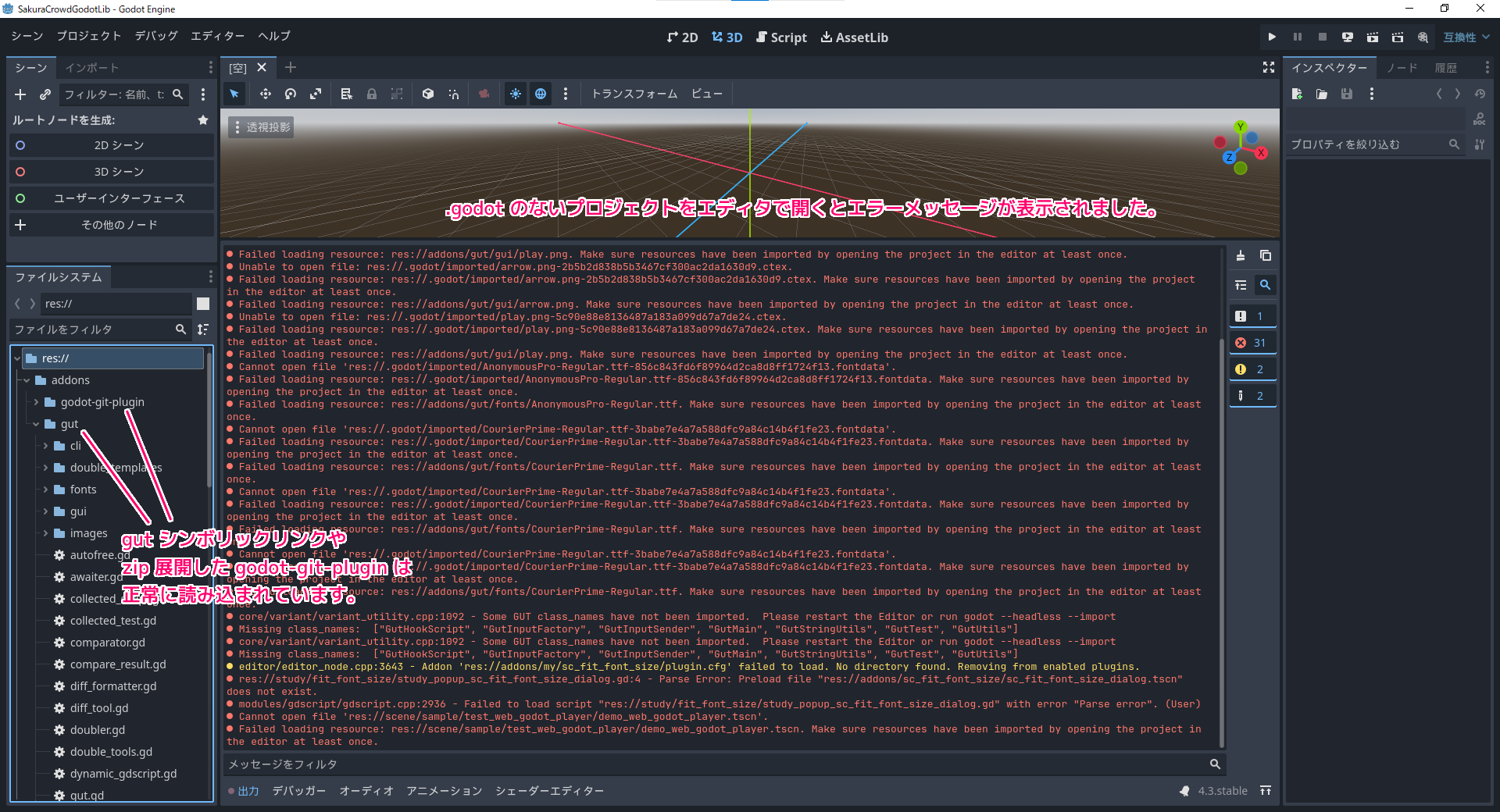
Godot Engine 4 のプロジェクトフォルダの .godot フォルダ(キャッシュデータ)を消した状態でプロジェクトを開くと発生したエラー「Failed loading resource」は、キャッシュデータを作成する際に発生する一時的なエラーです。
エディタ起動によって .godot フォルダが作成された後に、プロジェクトを開きなおすと解決しました。
今回は、.godot フォルダがない Godot Engine 4 のプロジェクトを開いた際のエラーとエディタ再起動の結果を紹介します。

※ GodotEngine のバージョンは v4.3.stable.official [77dcf97d8] です。
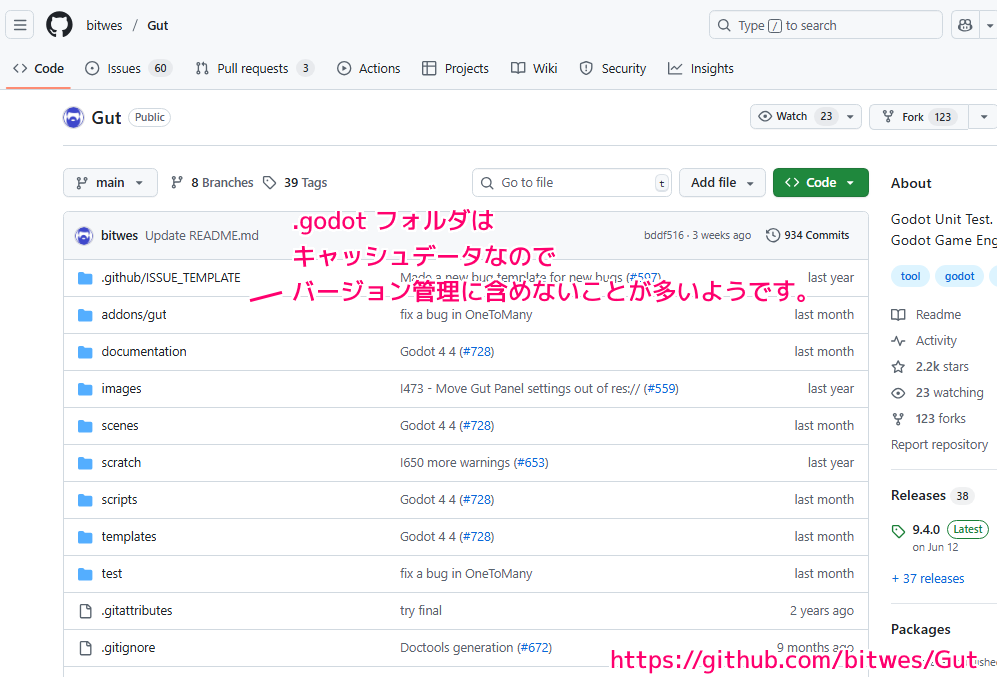
.godot フォルダはバージョン管理に含めない
プロジェクトフォルダに作成される .godot フォルダは、project.godot プロジェクトファイルとは異なり、キャッシューデータが配置されます。
削除した場合は、次回にプロジェクトをエディタで開くと再構築されます。
.godot フォルダにはエディタの設定が保存されてて、キャッシュデータとか一時ファイルとかが入ってるんだ。削除したら、次起動したときに再構築されるはず。
Godot 4.4 バグ: “ファイルが Godot の外部で変更されました” : r/godot
そのため .godot フォルダは、Git バージョン管理に含めないことが多いようです。
参照: bitwes/Gut: Godot Unit Test. Unit testing tool for Godot Game Engine.
前回紹介したスクリプトで、Git リモートリポジトリなどから GodotEngine4 のプロジェクトフォルダ(.godot フォルダはなし)を構築した後に、エディタで開いた際のエラー出力を紹介します。
.godot フォルダのないプロジェクトフォルダを GodotEngine 4.3 エディタで開きます。
※.godot フォルダのあるコミット元のプロジェクトフォルダでは、今回のエラーは表示されませんでした。
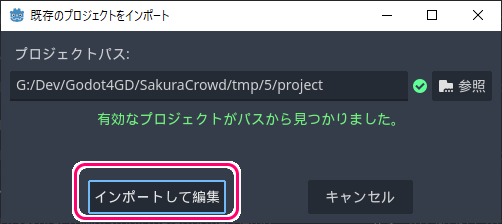
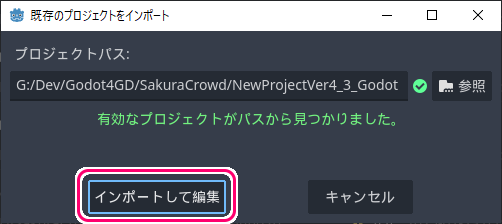
プロジェクトマネージャーウィンドウの「インポート」ボタンを押してから、プロジェクトフォルダを選択して、「既存のプロジェクトをインポート」ダイアログで「インポートして編集」ボタンを押します。
.godot がないプロジェクトを開いた直後のエラー
.godot フォルダがないプロジェクトをエディタで開くと、「Failed loading resource」エラーがいくつも表示されました。
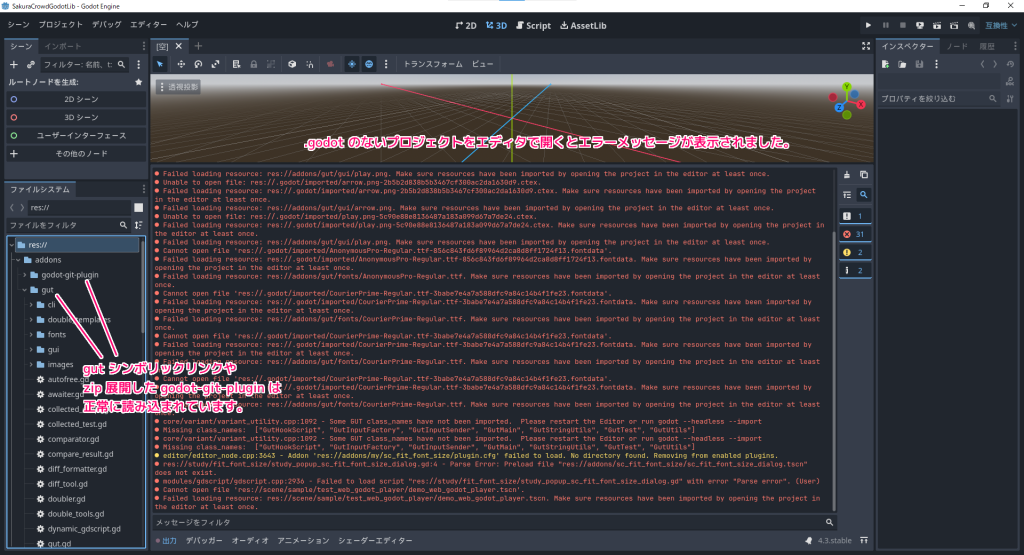
※シーンファイルをコミットし忘れたことで表示された「 tscn を開けません」というエラーについては、今回の .godot フォルダの有無とは無関係なので省略します。
Failed loading resource: res://.godot/imported/play.png-5c90e88e8136487a183a099d67a7de24.ctex. Make sure resources have been imported by opening the project in the editor at least once.
リソースの読み込みに失敗しました: res://.godot/imported/play.png-5c90e88e8136487a183a099d67a7de24.ctex。エディターでプロジェクトを少なくとも 1 回開いて、リソースがインポートされていることを確認してください。
.godotを除いたプロジェクトを GodotEngine4.3 エディタで開いた際のエラーメッセージの1つと Google 翻訳
Godot Engine v4.3.stable.official (c) 2007-present Juan Linietsky, Ariel Manzur & Godot Contributors.
--- Debug adapter server started on port 6006 ---
--- GDScript language server started on port 6005 ---
  Cannot get class 'GitPlugin'.
  Received a nullptr VCS extension instance during construction.
  editor/editor_file_system.cpp:2828 - Detected another project.godot at res://third_party/Gut. The folder will be ignored.
  Unable to open file: res://.godot/imported/play.png-5c90e88e8136487a183a099d67a7de24.ctex.
  Failed loading resource: res://.godot/imported/play.png-5c90e88e8136487a183a099d67a7de24.ctex. Make sure resources have been imported by opening the project in the editor at least once.
  Failed loading resource: res://addons/gut/gui/play.png. Make sure resources have been imported by opening the project in the editor at least once.
  Unable to open file: res://.godot/imported/arrow.png-2b5b2d838b5b3467cf300ac2da1630d9.ctex.
  Failed loading resource: res://.godot/imported/arrow.png-2b5b2d838b5b3467cf300ac2da1630d9.ctex. Make sure resources have been imported by opening the project in the editor at least once.
  Failed loading resource: res://addons/gut/gui/arrow.png. Make sure resources have been imported by opening the project in the editor at least once.
  Unable to open file: res://.godot/imported/play.png-5c90e88e8136487a183a099d67a7de24.ctex.
  Failed loading resource: res://.godot/imported/play.png-5c90e88e8136487a183a099d67a7de24.ctex. Make sure resources have been imported by opening the project in the editor at least once.
  Failed loading resource: res://addons/gut/gui/play.png. Make sure resources have been imported by opening the project in the editor at least once.
  Cannot open file 'res://.godot/imported/AnonymousPro-Regular.ttf-856c843fd6f89964d2ca8d8ff1724f13.fontdata'.
  Failed loading resource: res://.godot/imported/AnonymousPro-Regular.ttf-856c843fd6f89964d2ca8d8ff1724f13.fontdata. Make sure resources have been imported by opening the project in the editor at least once.
  Failed loading resource: res://addons/gut/fonts/AnonymousPro-Regular.ttf. Make sure resources have been imported by opening the project in the editor at least once.
  Cannot open file 'res://.godot/imported/CourierPrime-Regular.ttf-3babe7e4a7a588dfc9a84c14b4f1fe23.fontdata'.
  Failed loading resource: res://.godot/imported/CourierPrime-Regular.ttf-3babe7e4a7a588dfc9a84c14b4f1fe23.fontdata. Make sure resources have been imported by opening the project in the editor at least once.
  Failed loading resource: res://addons/gut/fonts/CourierPrime-Regular.ttf. Make sure resources have been imported by opening the project in the editor at least once.
  Cannot open file 'res://.godot/imported/CourierPrime-Regular.ttf-3babe7e4a7a588dfc9a84c14b4f1fe23.fontdata'.
  Failed loading resource: res://.godot/imported/CourierPrime-Regular.ttf-3babe7e4a7a588dfc9a84c14b4f1fe23.fontdata. Make sure resources have been imported by opening the project in the editor at least once.
  Failed loading resource: res://addons/gut/fonts/CourierPrime-Regular.ttf. Make sure resources have been imported by opening the project in the editor at least once.
  Cannot open file 'res://.godot/imported/CourierPrime-Regular.ttf-3babe7e4a7a588dfc9a84c14b4f1fe23.fontdata'.
  Failed loading resource: res://.godot/imported/CourierPrime-Regular.ttf-3babe7e4a7a588dfc9a84c14b4f1fe23.fontdata. Make sure resources have been imported by opening the project in the editor at least once.
  Failed loading resource: res://addons/gut/fonts/CourierPrime-Regular.ttf. Make sure resources have been imported by opening the project in the editor at least once.
  core/variant/variant_utility.cpp:1092 - Some GUT class_names have not been imported.  Please restart the Editor or run godot --headless --import
  Missing class_names:  ["GutHookScript", "GutInputFactory", "GutInputSender", "GutMain", "GutStringUtils", "GutTest", "GutUtils"]
  core/variant/variant_utility.cpp:1092 - Some GUT class_names have not been imported.  Please restart the Editor or run godot --headless --import
  Missing class_names:  ["GutHookScript", "GutInputFactory", "GutInputSender", "GutMain", "GutStringUtils", "GutTest", "GutUtils"]
  editor/editor_node.cpp:3643 - Addon 'res://addons/my/sc_fit_font_size/plugin.cfg' failed to load. No directory found. Removing from enabled plugins.
  res://study/fit_font_size/study_popup_sc_fit_font_size_dialog.gd:4 - Parse Error: Preload file "res://addons/sc_fit_font_size/sc_fit_font_size_dialog.tscn" does not exist.
  modules/gdscript/gdscript.cpp:2936 - Failed to load script "res://study/fit_font_size/study_popup_sc_fit_font_size_dialog.gd" with error "Parse error". (User)
  Cannot open file 'res://scene/sample/test_web_godot_player/demo_web_godot_player.tscn'.
  Failed loading resource: res://scene/sample/test_web_godot_player/demo_web_godot_player.tscn. Make sure resources have been imported by opening the project in the editor at least once.
「Failed loading resource」エラーを見ると、プロジェクトをもう1回開くように指示されています。
一度エディタを閉じます。
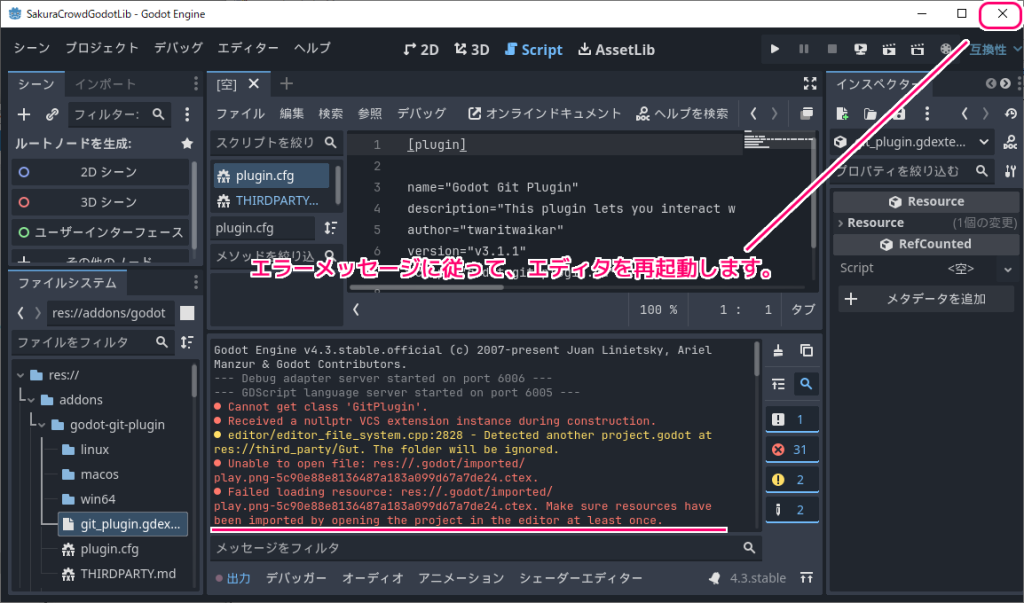
エラーメッセージに従って、プロジェクトを開きなおすと、「Failed loading resource」エラーメッセージが解消されました。
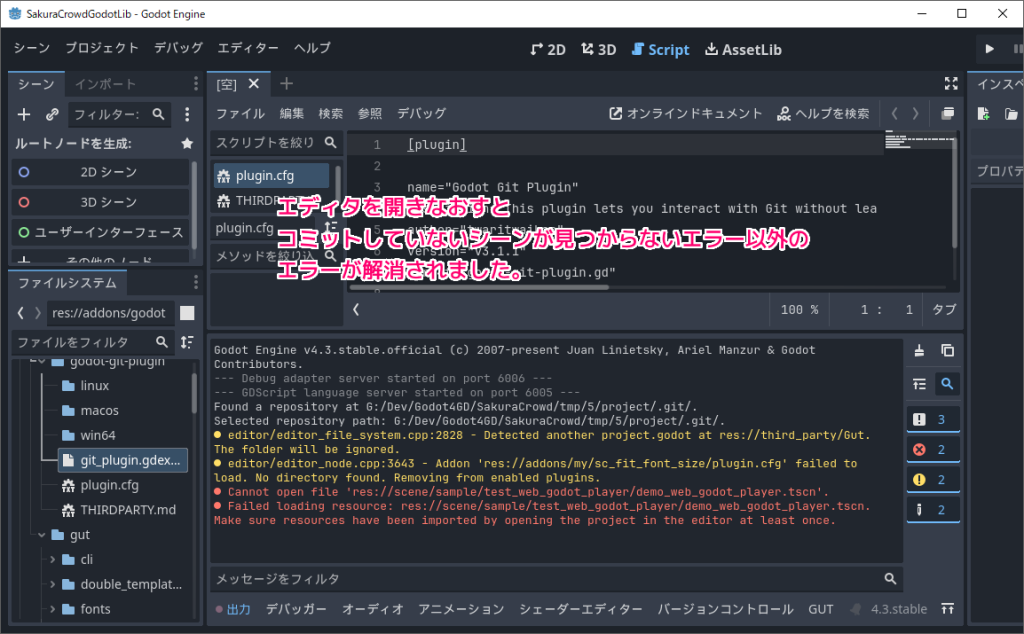
Godot Engine v4.3.stable.official (c) 2007-present Juan Linietsky, Ariel Manzur & Godot Contributors.
--- Debug adapter server started on port 6006 ---
--- GDScript language server started on port 6005 ---
Found a repository at G:/Dev/Godot4GD/SakuraCrowd/tmp/5/project/.git/.
Selected repository path: G:/Dev/Godot4GD/SakuraCrowd/tmp/5/project/.git/.
  editor/editor_file_system.cpp:2828 - Detected another project.godot at res://third_party/Gut. The folder will be ignored.
  editor/editor_node.cpp:3643 - Addon 'res://addons/my/sc_fit_font_size/plugin.cfg' failed to load. No directory found. Removing from enabled plugins.
  Cannot open file 'res://scene/sample/test_web_godot_player/demo_web_godot_player.tscn'.
  Failed loading resource: res://scene/sample/test_web_godot_player/demo_web_godot_player.tscn. Make sure resources have been imported by opening the project in the editor at least once.
空のプロジェクトで .godot を削除して開くとエラーは起きません
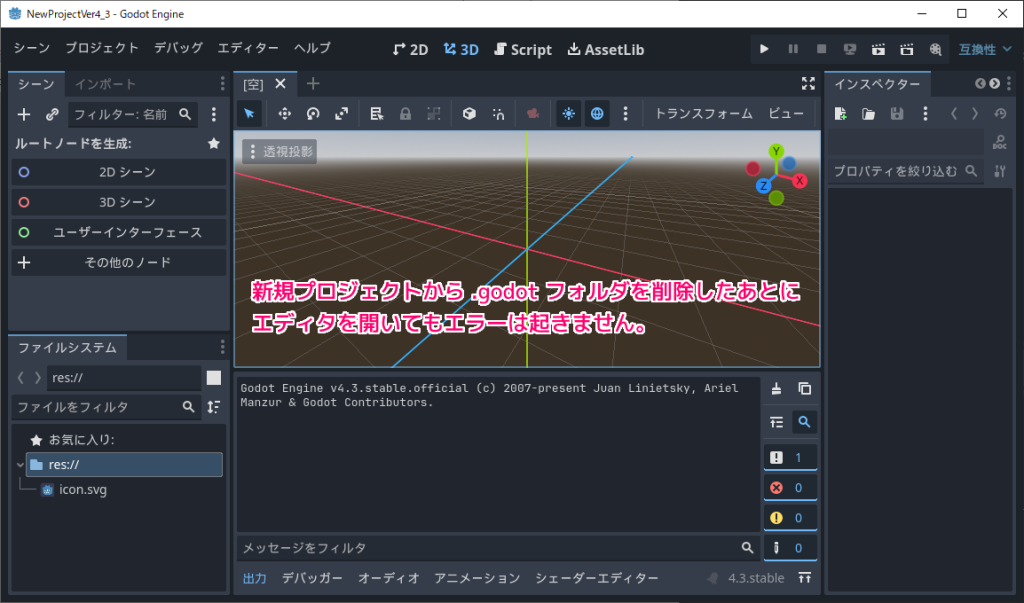
このエラーが空のプロジェクトで発生するかを試すと、発生しませんでした。
原因は特定できませんでしたが、キャッシュデータを参照するシーンファイルなどが配置された際に、 .godot を再構築する前に、それを参照しようとして一時的なエラーが起きるのかもしれません。
以下は、新規プロジェクト(空のプロジェクト)で .godot フォルダを削除して試した結果です。
GodotEngine を起動して、プロジェクトマネージャーウィンドウで「作成」ボタンを押した後、適当なプロジェクト名とプロジェクトパスを指定して、「作成して編集」ボタンを押します。
※レンダラーは「互換性」、バージョン管理メタデータは Git を選択しました。
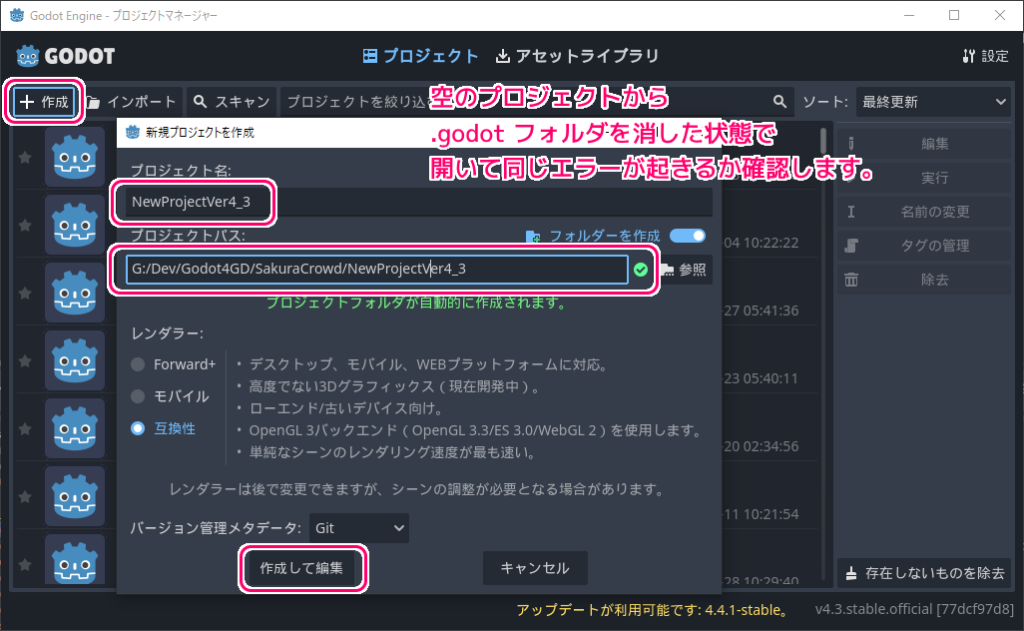
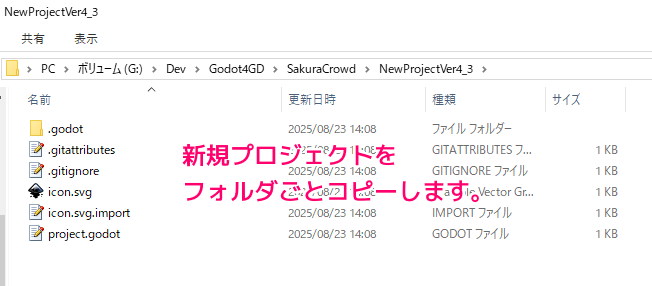
プロジェクトパスをエクスプローラで開くと、 .godot フォルダを含んだプロジェクトフォルダが作成されています。
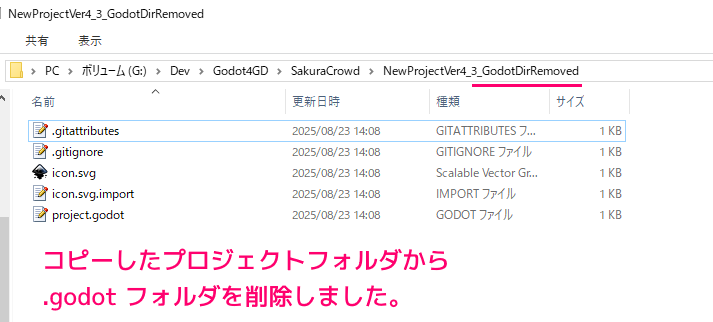
このプロジェクトフォルダをコピーして、別の名前(例では NewProjectVer4_3_GodotDirRemoved)で貼り付けます。
コピーしたプロジェクトフォルダ内から .godot フォルダを削除します。
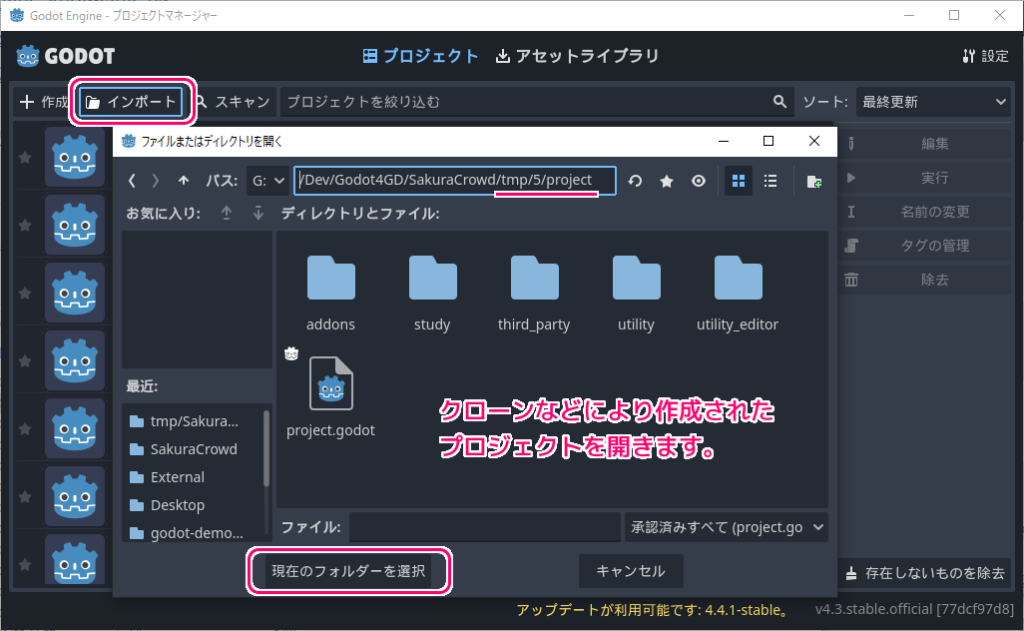
GodotEngine を起動して、プロジェクトマネージャーウィンドウで「インポート」ボタンを押して、 .godot フォルダを削除した新規プロジェクトフォルダを選択して、「現在のフォルダーを選択」ボタンでプロジェクトを開きます。
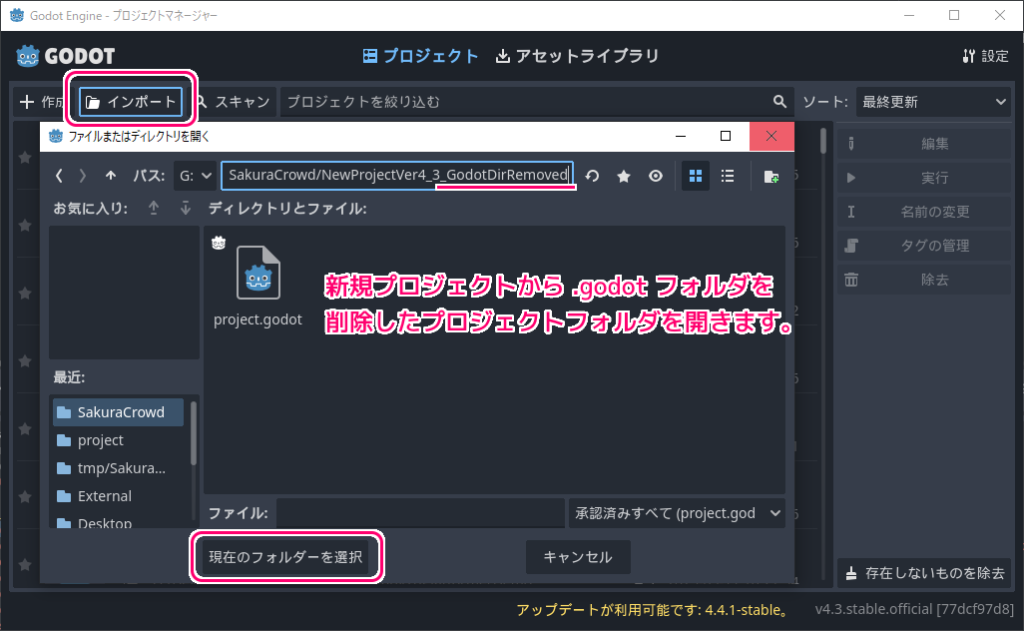
「インポートして編集」ボタンを押します。
新規プロジェクトの .godot フォルダを削除してからプロジェクトを開いてもエラーは発生しないことが確認できました。
まとめ
今回は、.godot フォルダがない Godot Engine 4 のプロジェクトを開いた際の「Failed loading resource」エラーは、エディタ再起動で解消することを確認しました。
また、新規プロジェクト(空のプロジェクト)で同様に .godot フォルダを削除してから開いても、そのエラーが起きないことが確認できました。
参照サイト Thank You!
- Godot Engine – 無料でオープンソースの2D・3Dゲームエンジン
- bitwes/Gut: Godot Unit Test. Unit testing tool for Godot Game Engine.
- Godot 4.4 バグ: “ファイルが Godot の外部で変更されました” : r/godot
記事一覧 → Compota-Soft-Press



コメント