Godot Engine のエディタ上で、プロジェクトのファイルの Git バージョン管理を行えるアドオン godot-git-plugin は、プラグインを有効にすると警告が発生しますが、GDExtension の仕組みにより、自動的に読み込まれ、「コミット」ドックから利用できます。
今回は、godot-git-plugin アドオンを Godot Engine 4.3 のプロジェクトに追加した後に、プラグインを有効にしようとすると表示される警告と、公式の説明、有効にしなくても「コミット」ドックが追加されて利用できることを紹介します。
※ GodotEngine のバージョンは v4.3.stable.official [77dcf97d8] です。
プラグインを有効にする際の警告の確認
godot-git-plugin アドオンを追加した後に、メニュー「編集」→「プロジェクト設定」で開いた「プロジェクト設定」ウィンドウの「プラグイン」タブで Godot Git Plugin の有効のチェックボックスをチェックすると、警告が出て、有効にできません。
※アドオンの追加は、Git plugin v3 · godotengine/godot-git-plugin Wiki に従って、 v3.1.1 の zip ファイルの中身をプロジェクトフォルダの addons\ に配置しました。エディタの AssetLib ワークスペースからも導入できます。
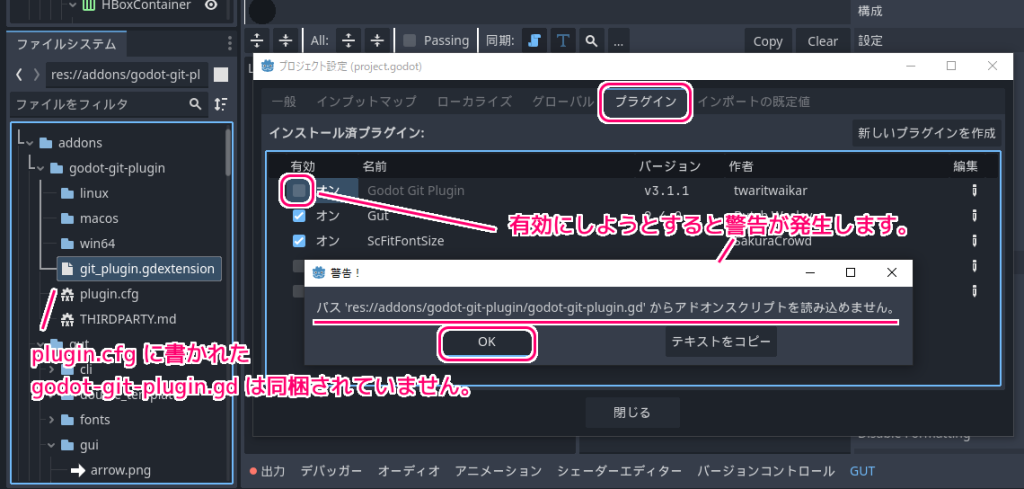
警告の内容は以下です。
パス ‘res://addons/godot-git-plugin/godot-git-plugin.gd’ からアドオンスクリプトを読み込めません。
上図の警告メッセージ
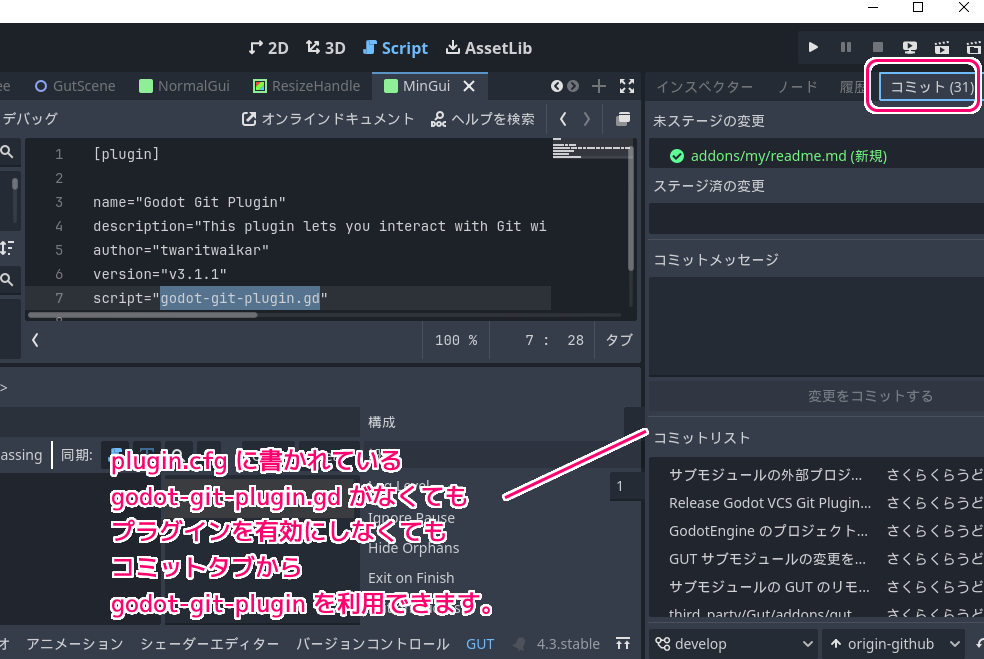
godot-git-plugin のプラグインの情報を定義した addons\godot-git-plugin\plugin.cfg を確認すると警告で表示された gd ファイルが指定されています。
しかし、ファイルシステムドックの addons\godot-git-plugin\ には、その gd ファイルは存在しません。
[plugin]

name="Godot Git Plugin"
description="This plugin lets you interact with Git without leaving the Godot editor. More information can be found at https://github.com/godotengine/godot-git-plugin/wiki"
author="twaritwaikar"
version="v3.1.1"
script="godot-git-plugin.gd"
これにより警告がでて、プラグインを有効にできないようです。
godot-git-plugin v3.1.1 の godot-git-plugin-v3.1.1.zip 内にも、その gd ファイルはありませんでした。
公式の説明
公式の使い方の説明を読むと、プラグインを手動で有効にする必要はなく、実際それはできないと書かれています。
You do not need to manually enable the plugin in the Project > Project Settings > Plugins tab. In fact, you can’t; that tab is for script-based plugins, GDExtension plugins, like this one, will be loaded automatically.
[プロジェクト] > [プロジェクト設定] > [プラグイン] タブでプラグインを手動で有効にする必要はありません。実際、それはできません。このタブはスクリプトベースのプラグイン用で、このような GDExtension プラグインは自動的にロードされます。
Git plugin v3 · godotengine/godot-git-plugin Wiki と Google 翻訳
GDExtension を利用した godot-git-plugin プラグインは自動的にロードされて利用できることも説明されています。
GDExtension is a Godot-specific technology that lets the engine interact with native shared libraries at run-time. You can use it to run native code without compiling it with the engine.
GDExtension は、エンジンが実行時にネイティブ共有ライブラリと対話できるようにする Godot 固有のテクノロジです。これを使用すると、エンジンでコンパイルせずにネイティブ コードを実行できます。
What is GDExtension? — Godot Engine (4.3)の日本語のドキュメント と Google 翻訳
実際に、プロジェクト設定の godot-git-plugin プラグインを有効にしなくても、「コミット」ドックが追加され、そこで、プロジェクト内のファイルの差分の確認やコミットが行えます。
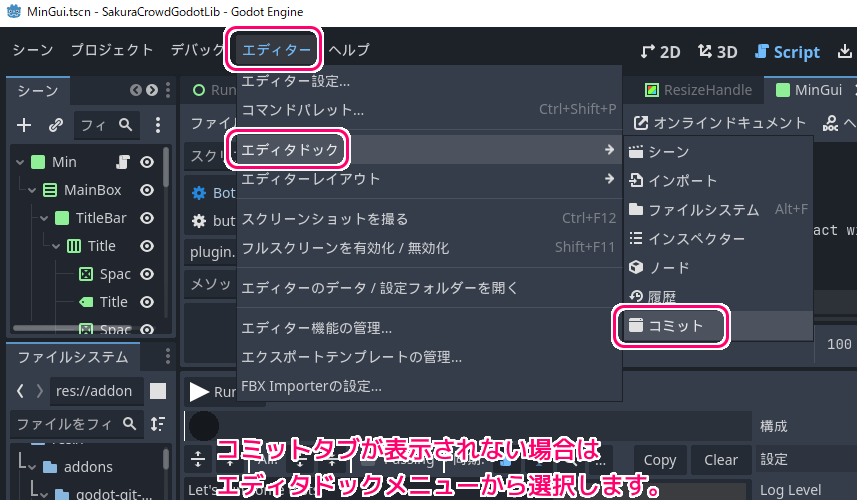
godot-git-plugin アドオンを導入しても「コミット」ドックが表示されていない場合は、メニュー「エディター」→「エディタドック」から「コミット」を選択しましょう。
まとめ
今回は、godot-git-plugin アドオンを Godot Engine 4.3 のプロジェクトに追加した後に、プラグインを有効にしようとすると表示される警告と、公式の説明、有効にしなくても「コミット」ドックが追加されて利用できることを紹介しました。
参照サイト Thank You!
- Godot Engine – 無料でオープンソースの2D・3Dゲームエンジン
- godotengine/godot-git-plugin: Git implementation of the VCS interface in Godot
- Release Godot VCS Git Plugin v3.1.1 · godotengine/godot-git-plugin
- Git plugin v3 · godotengine/godot-git-plugin Wiki
- What is GDExtension? — Godot Engine (4.3)の日本語のドキュメント
記事一覧 → Compota-Soft-Press



コメント