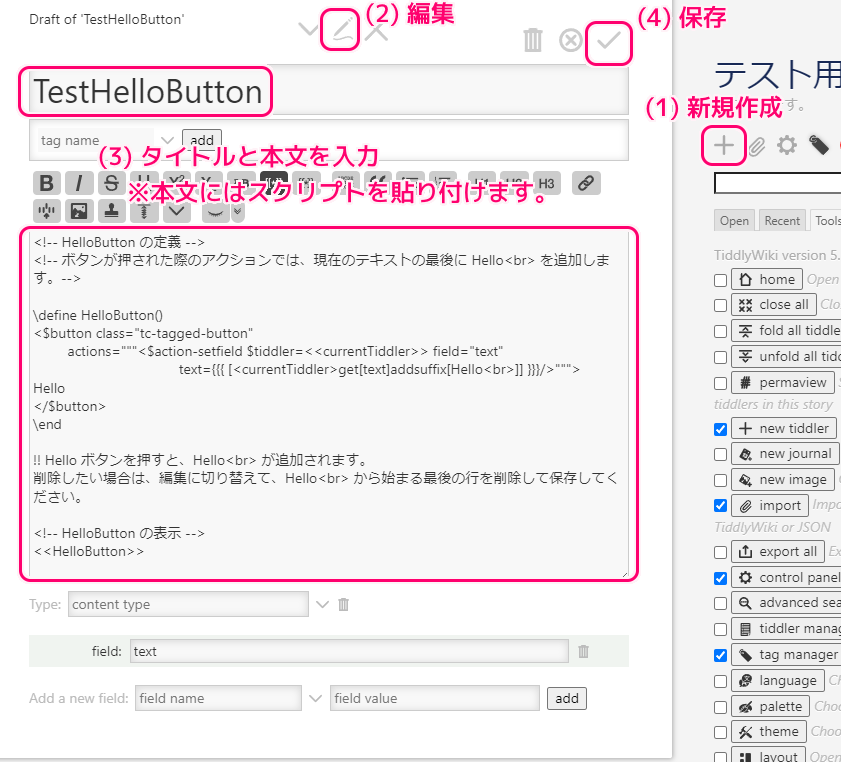
TiddlyWiki をローカルで編集・閲覧できる TiddlyDesktop アプリで、ボタンを表示して、そのボタンを押すとその Tiddler の本文に Hello という文字列が追加されるスクリプトとその実行結果を紹介します。
スクリプトで使われるウィジェットなどについても引用をもとに紹介します。

※ TiddlyWiki v5.3.8 を使用します。
※ TiddlyDesktop Version0.0.20 を使用します。
※スクリプトは自己責任でご利用ください。
前半の記事
スクリプトの説明
前回作成した、押すと本文に文字列を追加する Hello ボタンのスクリプトの各要素について紹介します。
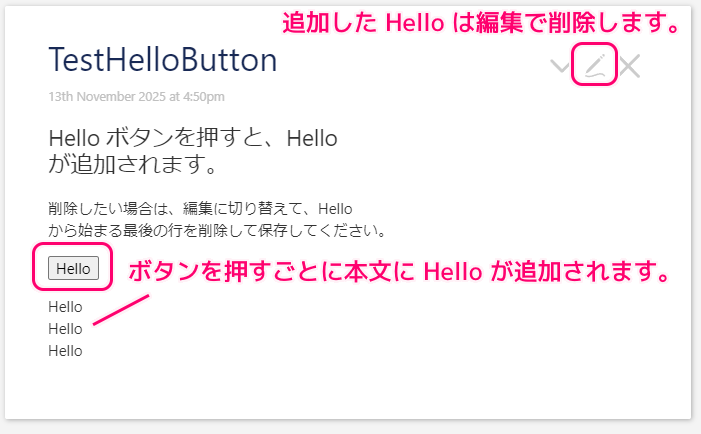
以下が上図の Tiddler 本文に貼り付けたスクリプトです。
最後の行の Hello<br> は、ボタンを押したことで追加された部分です。
<!-- HelloButton の定義 -->
<!-- ボタンが押された際のアクションでは、現在のテキストの最後に Hello<br> を追加します。-->

\define HelloButton()
<$button
    actions="""<$action-setfield $tiddler=<<currentTiddler>>
        text={{{ [<currentTiddler>get[text]addsuffix[Hello<br>]] }}}/>""">
Hello
</$button>
\end

!! Hello ボタンを押すと、Hello<br> が追加されます。
削除したい場合は、編集に切り替えて、Hello<br> から始まる最後の行を削除して保存してください。

<!-- HelloButton の表示 -->
<<HelloButton>>
Hello<br>Hello<br>Hello<br>
コメントの表記
前述のスクリプトの 1-2, 15 行目の <!– –> で囲まれた文字列は、HTML と同様にコメントとして扱われます。
HTML tags and comments can be used directly in WikiText. For example:
HTML タグとコメントは WikiText で直接使用できます。例えば:<!-- This comment will not appear in the wikified output -->HTML: TiddlyWiki v5.3.8 — a non-linear personal web notebook と Google 翻訳
また、TiddlyWiki 5.2 以降は、\define などのプラグマの内部でも <!– –> コメントが使用できるようになりました。
Comments can now be freely intermixed with pragmas as well as within the main body of a block of wikitext.
コメントは、ウィキテキストのブロックの本体内だけでなく、プラグマと自由に混合できるようになりました。
<!-- NEW: Comment that describes the macro -->HTML: TiddlyWiki v5.3.8 — a non-linear personal web notebook と Google 翻訳
\define test()
some text <!-- inline comment -->
\end
define プラグマによるマクロの定義
\define macro-name() から始まり、以降の \end の行までの部分は、 define プラグマによるマクロの定義です。
<<macro-name>> でマクロを展開します。
前述のスクリプトでは、4 行目の \define HelloButton() で HelloButton マクロを定義して、16 行目の <<HelloButton>> でマクロを展開しています。
HelloButton() のマクロではボタンに関する定義をしているので、 <<HelloButon>> の部分にそのボタンが表示されます。
The \define pragma is used to define macros.
\define プラグマはマクロを定義するために使用されます。
Pragma: \define: TiddlyWiki v5.3.8 — a non-linear personal web notebook と Google 翻訳
独自のボタンの定義
押すと本文に Hello<br> を追加するボタン HelloButton のマクロは以下です。
\define HelloButton()
<$button
    actions="""<$action-setfield $tiddler=<<currentTiddler>>
        text={{{ [<currentTiddler>get[text]addsuffix[Hello<br>]] }}}/>""">
Hello
</$button>
\end
5 ~ 7 行目では、TiddlyWiki 独自の Widget のひとつである button ウィジェット自体とそれが押された際の動作を定義しています。
また、8 行目では、そのボタンに表示するテキスト(例: Hello )を指定しています。
TiddlyWiki’s display is driven by an underlying collection of widgets. These are organised into a tree structure: each widget has a parent widget and zero or more child widgets.
TiddlyWiki の表示は、基礎となるウィジェットのコレクションによって駆動されます。これらはツリー構造に編成されます。各ウィジェットには親ウィジェットと 0 個以上の子ウィジェットがあります。
Widgets: TiddlyWiki v5.3.8 — a non-linear personal web notebook と Google 翻訳
The button widget displays an HTML
<button>element that can perform a combination of optional actions when clicked:ボタン ウィジェットには、クリックされたときにオプションのアクションを組み合わせて実行できる HTML 要素が表示されます。
button: TiddlyWiki v5.3.8 — a non-linear personal web notebook と Google 翻訳
6, 7 行目では、button ウィジェットの actions 属性で、ボタンが押された際の動作を定義しています。
actions
A string containing ActionWidgets to be triggered when the key combination is detected. Introduced in v5.1.23 the modifier variable lists the modifier keys that are pressed when the action is invoked. The possible modifiers are ctrl, ctrl-alt, ctrl-shift, alt, alt-shift, shift and ctrl-alt-shift
キーの組み合わせが検出されたときにトリガーされる ActionWidget を含む文字列。 v5.1.23 で導入された修飾子変数は、アクションの呼び出し時に押される修飾子キーをリストします。使用可能な修飾子は、ctrl、ctrl-alt、ctrl-shift、alt、alt-shift、shift、および ctrl-alt-shift です。
button: TiddlyWiki v5.3.8 — a non-linear personal web notebook と Google 翻訳
$action-setfield は、ActionWidgets という外観のないトリガーに応じたアクションを行う特別なウィジェットで、さきほどの button ウィジェットの actions 属性で指定しています。
Action widgets are a special type of widget that have no visual appearance but perform an action when triggered (such as sending a message, navigating to a tiddler, or changing the value of a tiddler). Action widgets are used in association with other widgets that trigger those actions (for example, the ButtonWidget).
アクション ウィジェットは、視覚的な外観はありませんが、トリガーされるとアクション (メッセージの送信、tiddler への移動、tiddler の値の変更など) を実行する特別なタイプのウィジェットです。アクション ウィジェットは、それらのアクションをトリガーする他のウィジェット (たとえば、ButtonWidget) と関連付けて使用されます。
ActionWidgets: TiddlyWiki v5.3.8 — a non-linear personal web notebook と Google 翻訳
action-setfield アクションウィジェットは、Tiddler の本文などのフィールドに値を割り当てるアクションです。
※他のアクションウィジェットと組み合わせて動作を定義できます。
The action-setfield widget is an action widget that assigns values to the fields of a tiddler. ActionWidgets are used within triggering widgets such as the ButtonWidget.
action-setfield ウィジェットは、tiddler のフィールドに値を割り当てるアクション ウィジェットです。 ActionWidget は、ButtonWidget などのトリガー ウィジェット内で使用されます。
action-setfield: TiddlyWiki v5.3.8 — a non-linear personal web notebook と Google 翻訳
$tiddler=<<currentTiddler>> 上記の $tiddler の代入文では、action-setfield アクションウィジェットが値を割り当てる Tiddler を指定しています。
currentTiddler は現在の Tiddler を指す変数です。
指定しなかった場合も既定で currentTiddler が割り当てられます。
$tiddler
The title of the tiddler whose fields are to be modified (if not provided defaults to the current tiddler)
フィールドが変更される tiddler のタイトル (指定されない場合は、デフォルトで現在の tiddler が使用されます)
action-setfield: TiddlyWiki v5.3.8 — a non-linear personal web notebook と Google 翻訳
The currentTiddler variable contains the title of the current tiddler.
currentTiddler 変数には、現在の tiddler のタイトルが含まれます。
currentTiddler: TiddlyWiki v5.3.8 — a non-linear personal web notebook と Google 翻訳
本文に Hello<br> を追加する処理
text={{{ [get[text]addsuffix[Hello<br>]] }}}text に割り当てる値を {{{ }}} の内部で定義します。
action-setfield アクションウィジェットで、text のように $ をつけない場合は、それをフィールドの名前と解釈して、そのフィールドに値を設定します。
text の場合は Tiddler の本文のフィールドを指すので、本文に値を設定します。
{any attributes not starting with $}
{$ で始まらない属性}Each attribute name specifies a field to be modified with the attribute value providing the value to assign to the field
各属性名は、フィールドに割り当てる値を提供する属性値で変更するフィールドを指定します。
action-setfield: TiddlyWiki v5.3.8 — a non-linear personal web notebook と Google 翻訳
最初の get Operator は、省略されている currentTiddler 変数の get で、現在の Tiddler の text 属性を取得します。
addsuffix で、その取得した text の末尾に指定した文字列(例:Hello<br>)を追加します。
select all values of a field in the input titles
入力タイトルのフィールドのすべての値を選択します
get Operator (Examples): TiddlyWiki v5.3.8 — a non-linear personal web notebook と Google 翻訳
extend each input title with a suffix
各入力タイトルを接尾辞で拡張します
addsuffix: TiddlyWiki v5.3.8 — a non-linear personal web notebook と Google 翻訳
まとめ
- コメントは <!– コメント –> のように記述します。
- \define macro-name() ~ \end のプラグマによって、マクロを定義します。マクロは <<macro-name>> でその場に展開します。
- button などの Widgets の動作は ActionWidgets を組み合わせて定義できます。
- action-setfield ActionWidget は、本文などのフィールドの内容を設定できます。
- get 演算子で属性を取得できます。
- addsuffix で末尾に文字列を追加できます。
参照サイト Thank You!
- Widgets: TiddlyWiki v5.3.8 — a non-linear personal web notebook
- Widgets: TiddlyWiki v5.3.8 — a non-linear personal web notebook #ウィジェット一覧
- button: TiddlyWiki v5.3.8 — a non-linear personal web notebook
- ActionWidgets: TiddlyWiki v5.3.8 — a non-linear personal web notebook
- action-setfield: TiddlyWiki v5.3.8 — a non-linear personal web notebook
- currentTiddler: TiddlyWiki v5.3.8 — a non-linear personal web notebook
- get Operator (Examples): TiddlyWiki v5.3.8 — a non-linear personal web notebook
- addsuffix: TiddlyWiki v5.3.8 — a non-linear personal web notebook
記事一覧 → Compota-Soft-Press



コメント